
Screenshots
About this app
Battery Guru is a comprehensive battery status tracking and management application designed to help users monitor their device's power health and extend overall battery lifespan. Because phone batteries degrade gradually with every charge cycle and regular usage, minimizing wear and managing charging habits are essential tasks. This app addresses these challenges by offering real-time tracking of critical battery metrics, optimization features, and warning alerts that give users complete control over how energy is consumed and replenished.
How do you view and analyze your current battery status?
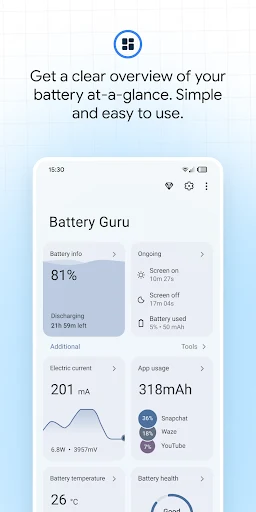
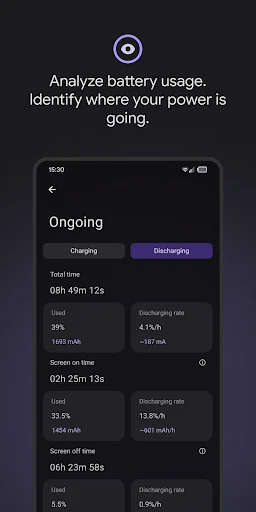
After opening Battery Guru, users can immediately access a detailed breakdown of core battery parameters, including temperature, operational status, and remaining battery level. The app goes beyond basic percentages by displaying detailed statistics such as voltage, current, power, and estimated remaining usage or charging times. It also tracks battery capacity in milliamp-hours (mAh), cycle loss, and records the highest charging temperatures to provide a thorough overview of your battery health over time.
What optimization and power-saving tools does the app provide?
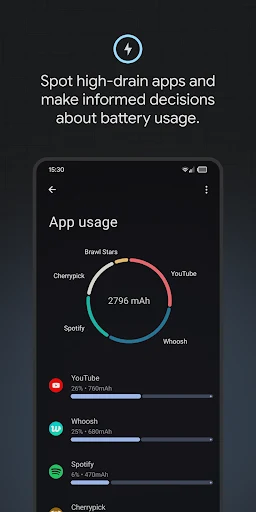
To help improve overall performance, Battery Guru offers optimization tools that analyze which applications consume the most resources, allowing users to close resource-heavy processes. The app features shortcuts to classic power-saving methods—such as adjusting screen brightness and turning off Wi-Fi, Bluetooth, or vibration. Furthermore, users can customize their device's Doze mode settings to minimize power consumption even when the screen is turned off, alongside utilizing home screen widgets for quick access to key information.
How do warning features and alerts protect your battery?
The application includes an extensive suite of warning and notification features to prevent unexpected power depletion or potential hardware stress. It provides full charge alerts to help users disconnect the charger on time, low battery warnings to prevent sudden shutdowns, and abnormal power consumption alerts to identify unexpected background drains. Additionally, it issues two-way temperature alerts for high and low temperatures. Users can also configure status bar icons to display battery percentages or temperatures, and set do-not-disturb periods for alerts.
Who can benefit most from using Battery Guru?
Device owners who want granular visibility into their charging sessions, charger and cable performance, and app-specific wake-up events will find Battery Guru particularly useful. It suits users looking to actively maintain their phone battery through structured charging control tips, usage plans, and segmented app tracking. While the free version offers a robust set of features, users should note that optional subscriptions are available, and certain warnings—such as overcharge alerts above 80%—may behave differently depending on modern device hardware.
Version history
View all10 Jun 2026 · stable
Frequently asked questions
What kind of charging session history does the app track?
Battery Guru provides a comprehensive charging session history, allowing users to compare the performance of different chargers and cables.
Can I customize how battery information is displayed in the status bar?
Yes, you can use a customizable status bar icon to display your battery percentage, temperature, or both.
Does Battery Guru track app-specific power usage?
Yes, the app provides segmented usage and wake-up event tracking by individual applications, displaying wake lock status since the last charge to help identify sources of power degradation.