
Screenshots
About this app
Dolby Atmos helps supported Android phones and tablets process audio for a wider, more immersive listening experience across movies, music, games, podcasts, audiobooks, and voice calls. Its purpose is practical: dialogue can remain easier to follow, instruments and effects can have clearer separation, and game sounds can be easier to place around the listener. The utility is designed to work with built-in speakers and headphones, while available profiles and equalization controls let users adjust the presentation for different kinds of content.
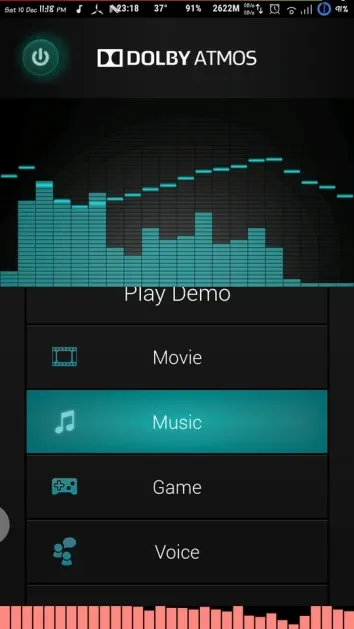
Sound profiles for different content
The app’s listening approach changes according to what you are doing. A movie-focused profile emphasizes clear dialogue and surrounding effects, which can help separate speech from a busy soundtrack. Music playback is described as supporting fuller instrument tones and smoother bass, while a game profile focuses on locating cues such as footsteps, vehicles, and other effects. A voice-oriented setting gives podcasts, audiobooks, and calls greater prominence, and a dynamics option provides a more balanced presentation for users who move between music and video.
Spatial positioning and detail
Dolby Atmos presents compatible sound with a sense of height and width rather than treating every element as coming from one flat point. In movies and games, this spatial layout is intended to make scenes feel more natural and to keep the sound field consistent as the listener or in-game viewpoint moves. The source also describes clearer voices and more noticeable subtle effects, including quiet details that can otherwise be lost in complex scenes.
Mobile speakers and headphones
The utility is intended to adapt its processing to the smaller drivers found in phone and tablet speakers and to headphones on supported devices. This balances loudness and spatial presentation for everyday streaming and mobile gaming. Users can connect headphones or listen through the device’s built-in speakers, then check the available sound settings to see whether Dolby Atmos is supported or whether a Dolby app is already installed.
Equalization and everyday listening
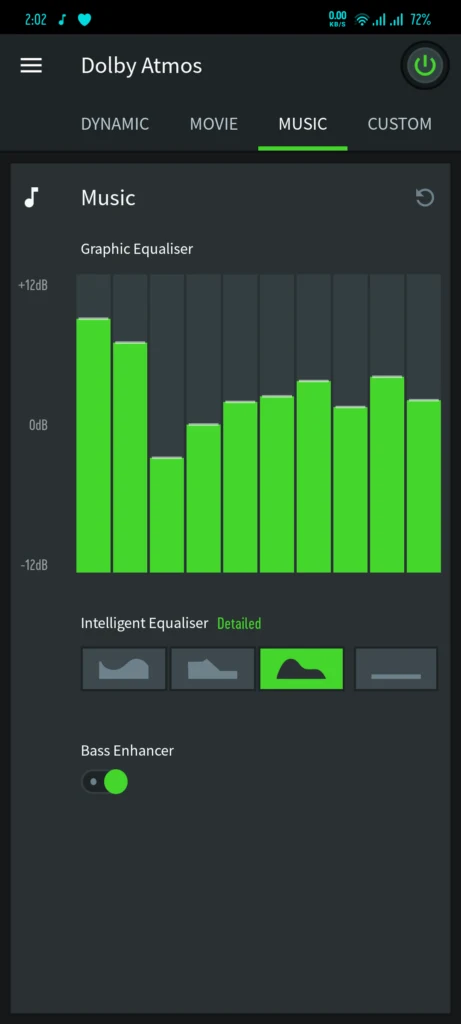
Equalization can be adjusted to suit personal preferences rather than relying on one fixed sound. This is useful when switching between bass-focused music, dialogue-heavy video, and spoken content. Albums mastered with Dolby Atmos may also place harmonies, percussion, and ambient elements in separate areas of the sound field, giving compatible music a more layered presentation. The source describes the interface as clean and user-friendly and identifies the app as free.
Using Dolby Access with Windows equipment
The source also describes a related Windows setup through Dolby Access. On a Windows computer, users can enable Dolby Atmos for headphones or configure compatible HDMI equipment such as a television, soundbar, or receiver. Dolby Access presents available modes and options, and its built-in demo can help confirm whether the setup is working. This Windows guidance is separate from checking Dolby Atmos support on an Android phone or tablet.
Checking compatibility and trying the settings
Support depends on the device, so the first step is to look for a Dolby Atmos option in the phone’s sound settings or open any pre-installed Dolby app. On a supported device, users can select an available profile, enable Dolby Atmos, and adjust equalizer or smart equalizer controls. Playing an official Atmos demo, or content labelled Dolby Atmos, provides a way to compare spatial positioning and dialogue clarity before fine-tuning the settings for different material.
Version history
View all29 May 2026 · stable
Frequently asked questions
What devices can use Dolby Atmos?
The source describes Dolby Atmos for supported Android phones and tablets, using built-in speakers or headphones. Support should be checked in the device’s sound settings or in a pre-installed Dolby app.
Can Dolby Atmos be used for gaming?
Yes. The gaming-focused processing is described as helping users locate footsteps, vehicles, and other audio cues with more precise three-dimensional positioning.
Does Dolby Atmos include equalizer controls?
The source says that users can adjust music equalization and, where available, change sliders or smart equalizer options.
How can I check whether the sound setup is working?
On Android, users can play an official Atmos demo or Dolby Atmos-labelled content and compare spatial positioning and dialogue clarity. On Windows, Dolby Access includes a built-in demo for checking a compatible setup.