
Screenshots
About this app
Overview
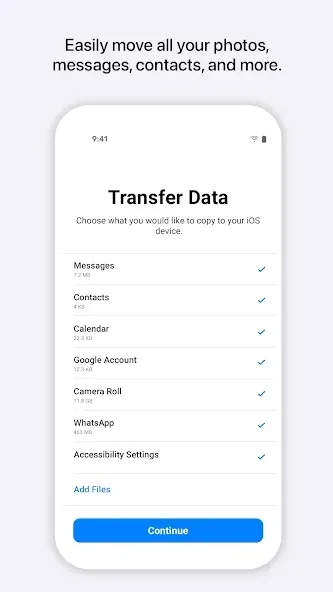
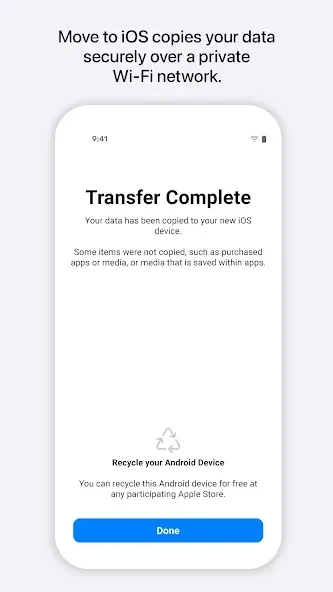
Move to iOS is a data transfer tool that creates a direct connection between an Android device and a new iPhone or iPad to move content automatically. The app supports transfers over a temporary private Wi-Fi link secured by a one-time code or via an optional USB-C cable for greater stability with large libraries. It handles contacts, SMS and MMS messages, group chats, camera photos and videos, calendars, mail accounts, call history, voice memos, and WhatsApp messages along with their media. After the move finishes, the tool identifies free Android apps that have equivalents on the App Store and assists with carrier SIM or eSIM activation so phone service continues without interruption. The process runs during the initial setup of the target device and requires no manual file handling on either side.
What You Can Do
⭐ Users establish a guided connection by entering a one-time code that creates a temporary private Wi-Fi network; the app requests only the permissions needed for the chosen data types, such as location access solely for Wi-Fi configuration.
⭐ A USB-C cable option provides a wired link that maintains consistent speed even when surrounding wireless networks fluctuate, making it suitable for moving hundreds of gigabytes of photos and videos.
⭐ The app transfers a broad set of items including WhatsApp chat history and media when the same phone number is used on both devices, placing each category into the corresponding app on the new iPhone.
⭐ After transfer, Move to iOS lists free Android apps that exist on the App Store so the user can install only the ones they actually want during final setup.
⭐ Carrier details are passed across so SIM or eSIM activation can be completed at the correct moment, preserving the existing phone number and service plan.
Using the App
The workflow begins on the new iPhone during its first-time setup screen, where the option to move from Android appears. On the Android device the user installs Move to iOS, grants the requested permissions, and either connects over Wi-Fi or attaches a USB-C cable. Data selection occurs on the Android side; once chosen, the transfer proceeds automatically while both devices remain plugged in. Progress is shown on screen and the process can be paused only by disconnecting the link. After completion the iPhone continues its normal setup, installing suggested apps and activating the SIM as prompted. The app does not remain installed or functional after this initial use.
Why It May Appeal
✅ The tool is free and compatible with thousands of Android devices running version 4.0 and higher, removing any cost barrier for users switching platforms.
✅ Clear step-by-step prompts and optional permissions let users control exactly which data types are moved, reducing post-setup cleanup.
✅ Support for WhatsApp and carrier activation addresses two common pain points that otherwise require separate manual workarounds.
Things to Consider
❎ Data can only move in one direction; once transferred there is no built-in method to send the same content back to an Android device.
❎ The transfer option is available solely during the initial setup of a new or erased iPhone, so any device that has already been configured must be erased before the app can be used.
Version history
View all09 Sep 2026 · stable
Frequently asked questions
Does Move to iOS transfer my WhatsApp messages?
Yes, the app now supports the transfer of WhatsApp chat history. You must ensure you are using the same phone number on both devices. During the selection process, check the box for WhatsApp to include your conversations and media.
How long does the transfer process take?
The duration depends on the volume of data you are moving. A few gigabytes might take ten minutes, while hundreds of gigabytes could take an hour or more. A stable Wi-Fi connection and keeping the devices plugged in will speed up the process.
Will my apps move to the new iPhone?
The app files themselves do not move because the systems are different. However, the tool identifies free apps you had and finds their counterparts on the App Store. You can then download them all at once during the final setup phase.
Can I use the app after I have already set up my iPhone?
No, the option to move data only appears during the initial setup of a new or erased iPhone. If you have already configured your device, you must erase it and start over to use the app. Alternatively, you can move data manually.
Do I need a SIM card in both phones?
You do not need a SIM card in the old device to use the app. It relies entirely on a direct Wi-Fi connection. However, having a SIM card in your new iPhone is helpful for activation and verifying your accounts.