
Screenshots
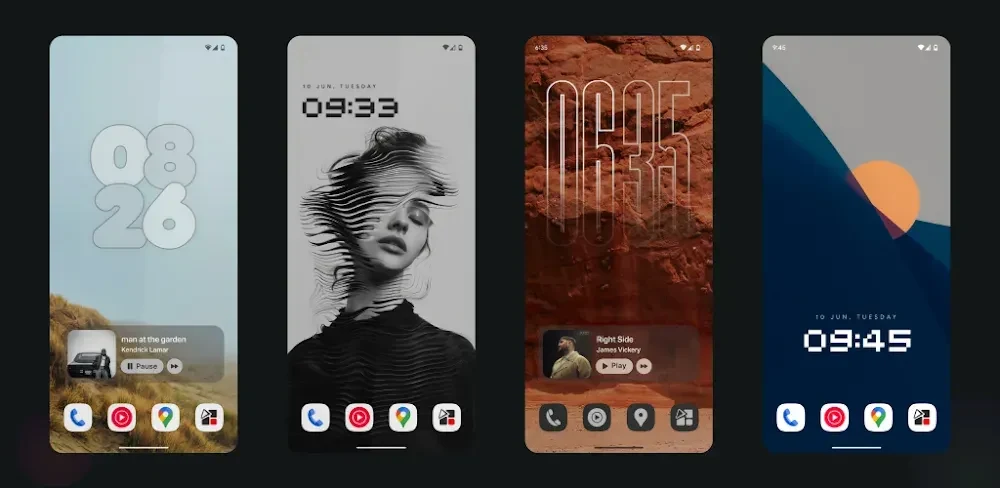
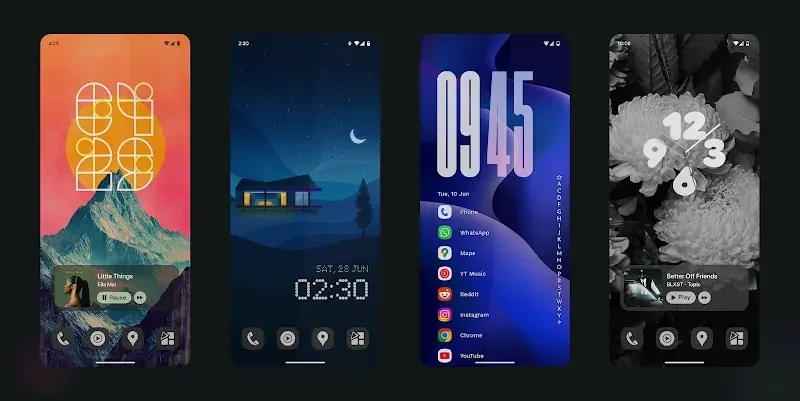
About this app
Overview
Muviz Widgets supplies Android users with clock, weather, battery, and music widgets that operate directly on the home screen and, where supported, the lock screen. The app centers on independent placement without third-party hosts, an editor that updates layouts live, and color tools that sync with the system Material You palette or pull from album art. Users can adjust spacing, fonts, modules, alignment, hue, saturation, and transparency while the widgets remain memory-efficient and avoid frequent redraws. New designs are added regularly, and the same editor handles wallpapers and themes to keep the entire screen consistent. The approach suits anyone who wants precise visual control and simple setup on phones or tablets.
What You Can Do
⭐ Place independent widgets directly on the home screen or lock screen without any extra host application, reducing setup steps and keeping the layout clean.
⭐ Open the built-in editor to move elements, change fonts, adjust spacing and alignment, and watch changes appear instantly for faster final design.
⭐ Choose Material You system colors, preset palettes, custom colors, or automatic colors taken from album artwork for music widgets to maintain visual harmony.
⭐ Scale widgets across compact phones and large tablets while preserving detail and avoiding pixelation through performance scaling.
⭐ Apply high-resolution assets crafted for modern displays so every icon and widget element stays crisp on high-density screens.
⭐ Control hue, saturation, and transparency of every widget component with an advanced color picker to match wallpapers or icons exactly.
Using the App
Widgets install straight to the home screen through the standard Android widget picker. Once placed, a tap opens the editor where users adjust modules, fonts, and colors with live preview. System theming is enabled by default, yet manual palettes or album-art extraction can be selected at any time. Memory and redraw limits follow current Android guidelines, so multiple widgets can stay active without noticeable battery impact during normal use. New widget styles appear through updates, and the same editor tools apply to theme and wallpaper elements for unified results.
Why It May Appeal
✅ No third-party host is required, which removes extra steps and keeps the screen layout simpler than many widget collections.
✅ Battery and memory use stay low because the design avoids unnecessary background work and frequent redraws, supporting steady daily operation.
✅ Live editor feedback and full color control let users reach precise layouts without switching between multiple tools or apps.
✅ Widgets and themes scale cleanly from small phones to large tablets while retaining detail, giving consistent appearance across devices.
Things to Consider
❎ Occasional time-display glitches have been reported by users and may require resetting color settings to correct, adding a minor maintenance step every few days.
❎ Some advanced requests such as extra clock styles, custom fonts, or additional corner-radius options remain unavailable, so users seeking every possible preset may need to wait for future updates.
Version history
View all05 Sep 2026 · stable
Frequently asked questions
What is the app used for?
It is used to customize Android home and lock screens with beautiful clock, music, and battery widgets.
Does the app require any third-party applications?
No. All widgets work independently without requiring any third-party apps.
Can I customize the widget colors?
Yes. You can use Material You colors, system colors, album artwork colors, preset colors, or your own custom colors.
Does the app consume a lot of battery?
No. The app is optimized to use very little battery and memory.
Can I use the widgets on the lock screen?
Yes. Supported widgets can be placed on both the home screen and lock screen.
Are new widgets added over time?
Yes. The developers regularly introduce new widget designs and features through updates.