
Screenshots
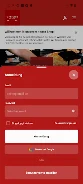
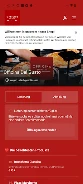

About this app
Officina Del Gusto Brühl helps diners browse the restaurant’s menu, make or change reservations, and arrange takeout orders. Its menu pages pair dish photographs with details such as ingredients, allergens, portions and prices, while reservation and ordering tools support planning a visit or pickup. A profile area brings together loyalty progress and personal settings.
Menu details for choosing a meal
The menu is organized into sections including starters, main courses, desserts and beverages. Users can browse those sections and open individual dishes for preparation notes, allergen information and suggested pairings. The description also identifies vegetarian, gluten-free and chef’s recommendation filters as ways to narrow the choices. Seasonal menu changes and chef specials are noted in the app description, as are estimated serving times.
Dish photographs and ingredient information can help diners compare options before deciding. The menu is also described as including timing estimates, portion guidance and prices. These details are useful when reviewing choices in advance, including for people who want to check allergen information before placing an order or booking a table.
Reservations and takeout orders
For a reservation, the app provides fields to select a date and time, enter the number of guests, and add seating preferences or special requests before confirming. Users can also modify reservations. The description says confirmations can be synchronized with the device calendar if the diner chooses.
For takeout, diners can add items to a cart, remove them, choose a pickup window and proceed to checkout. The app description also says available loyalty credits can be applied during checkout. These options connect menu browsing with order preparation, while the reservation tools cover visits to the restaurant.
Loyalty and saved preferences
The loyalty program tracks points accumulated through visits and spending. According to the description, points can unlock rewards, discounts or priority booking windows, and the profile screen shows progress toward the next reward. The app also includes saved favorites and lists of favorite dishes, as well as dietary notes and ordering preferences such as portion size or preferred sides. These saved details are intended to support repeat orders and meal planning.
App controls and settings
Menu sections can be browsed by swiping, and tapping a dish opens its details. The description also notes photo zoom and a bottom navigation bar for Home, Menu, Reservations and Profile. Within the profile area, users can adjust font size, choose a high-contrast theme, manage contact preferences and control push notifications, including loyalty alerts. Screen-reader support and larger touch targets for key actions are also described.
Access when connectivity is intermittent
The app description states that recently viewed menus and active reservations remain available when connectivity is intermittent. It also describes caching for recently accessed screens and background updates for reservation confirmations and order status. These documented functions relate to viewing saved information and receiving updates; they do not establish that every app feature works offline.
Version history
View all12 Oct 2026 · stable