
Screenshots
About this app
Choosing a live mode
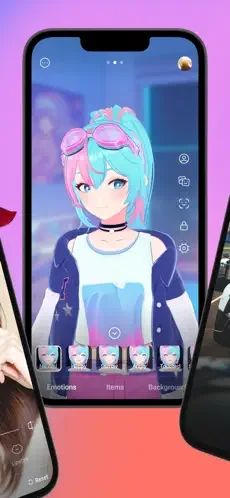
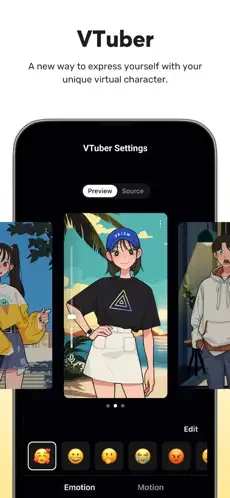
PRISM Live Studio lets users start a broadcast in one of three modes: Camera, Screen, or VTuber. Camera mode captures a face through the phone's camera. Screen mode shares the mobile display, which the source describes as useful for streaming gameplay or tutorials. VTuber mode places a virtual avatar on stream, and the source states that it supports both 2D and 3D VRM avatars without requiring additional software. Because all three modes sit inside one app, a creator who moves between a face camera, a gameplay feed, and an avatar presentation does not need to switch tools.
Screen sharing and switching between apps
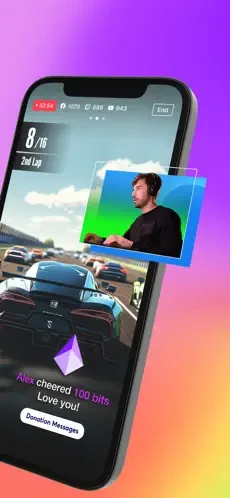
The Screencast feature is described as real-time sharing of the phone screen or game footage. According to the source, users can move between applications, adjust settings, and continue streaming without stopping the broadcast. High-definition streaming is listed as an option when the device and app environment support it, so the resolution a user reaches depends on the phone and the setup rather than being guaranteed. The FAQ also confirms that screen sharing is available on both iOS and Android devices.
VTuber broadcasting
For VTuber streams, the source presents the phone as a self-contained studio. The basic process it describes is to open the app, choose an avatar, and go live. Custom avatars are mentioned alongside free VRM models for both 2D and 3D settings. The main use case is building a personal virtual identity for a broadcast. The source does not explain how users would import their own avatars, so anyone planning to use a custom model should confirm the supported options within the app.
Linking accounts and streaming to several platforms
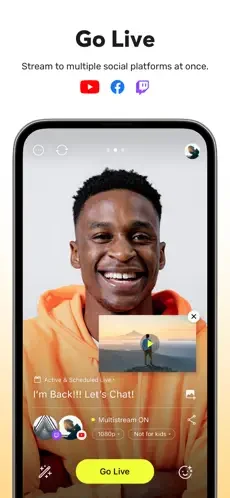
Account integration allows users to link YouTube, Facebook, Twitch, or BAND accounts through a login. The source says that once these accounts are linked, users can broadcast to them without reconfiguring settings for each stream. The Multi-Platform Broadcasting function is described as streaming to more than one platform at the same time without additional setup, and the FAQ confirms simultaneous broadcasting to platforms such as YouTube, Facebook, and Twitch.
Effects, text overlays, and background music
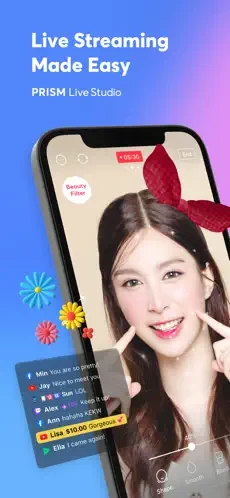
The app includes several categories of visual enhancement. Beauty Effects are described as automatic appearance adjustments intended to look natural. Camera Effects include masks, filters, touch filters, and stylish overlays. Animated Text Effects allow simple text overlays or animated themes on a live stream. Background Music provides free music themes for different moods. The general description adds that users can apply filters, stickers, effects, and music to videos, and it says more editing tools and materials will be released over time. That last point is a stated plan from the publisher rather than a current feature to depend on.
Camera controls, Chroma Key, and Windows connection
Professional Camera Options include manual focus and exposure control for users who want more control over how footage looks. Chroma Key is listed as a tool for creative video shooting. CONNECT Mode allows the phone camera to link to the PRISM Windows app through a QR code scan, which is a separate connection function. Real-time editing lets users change details of a live stream and share its live URL while broadcasting.
What user reviews report
The source includes several user reviews. They describe individual experiences and are not independent testing, so they are best read as examples of reported concerns. One reviewer praises the live interaction with subscribers and asks whether a guest could be added to the panel. Another asks for a delay option to reduce choppy-looking speech and says that music cannot be added in screen sharing mode, which leads that user to VTuber mode when they want background music. A third reviewer reports crashes and freezing after a recent update, including difficulty ending a stream. These reports show what some users have raised, but they do not establish how the app performs for everyone.
Free and premium versions
The source's FAQ states that PRISM Live Studio has both free and premium versions. The free version is described as including basic features, while the premium version unlocks additional advanced features. The source also says streams can be scheduled in advance so that an audience can be notified before a broadcast. The specific features included in each version are not itemized in the material provided, so users should check the app's current listing for those details.
Version history
View all21 Jan 2026 · stable
Frequently asked questions
Does PRISM Live Studio support screen sharing?
Yes. The source states that PRISM Live Studio supports screen sharing on both iOS and Android devices, which lets users share their screen during a live stream or while creating content.