
Screenshots
About this app
Assistive Touch Mod is an Android tool in the Tools category that places a small circular icon on the screen and uses it as a control point for gesture-based shortcuts. According to its description, the main purpose is to let people adjust common phone settings and reach frequently used functions with a few taps or swipes, instead of searching through menus each time.
A floating circle as the control point
The core of the app is a circular icon that stays on the screen. The source describes it as a compact control panel from which users can adjust various parameters and modify processes on their phone. Because the panel remains within reach, the description presents it as a simple way to manage many tasks from one place.
Gesture shortcuts for quick settings
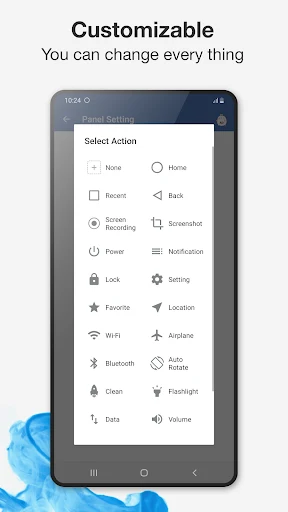
Users can set up shortcuts that open specific adjustments when they slide a finger in a chosen direction on the circle. The source names Wi-Fi, Bluetooth, screen brightness, screen rotation, flight mode, and the flashlight among the options that can be reached this way. According to the description, users can also customize which shortcuts appear, so the panel can be arranged around the settings they use most. The stated benefit is that people do not need to search manually to turn these options on or off.
Virtual Home button and navigation
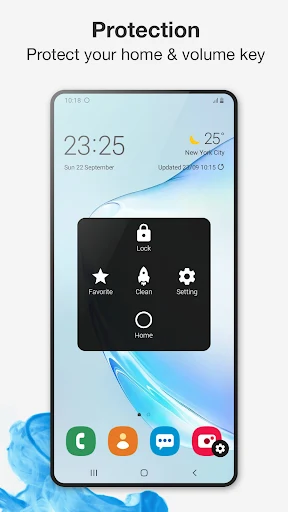
One documented function is a virtual Home button that replicates the physical Home button. Tapping it returns to the home screen, and the source says it can also be used for other tasks such as taking screenshots or locking the device. The description adds that the circle can support gesture-based navigation, where swiping up, down, left, or right on the virtual button triggers specific actions. The source further states that the panel can provide access to volume and power controls, allowing users to adjust audio or turn off the screen with a single tap.
Why a virtual Home button is relevant
The source explains that Android devices are often operated through physical buttons, and that virtual buttons are less commonly available. Its description says the app supports creating a virtual Home button for Android devices so that users can interact with available functions more easily. The app is therefore positioned as a way to add on-screen button control to a device that may not offer it by default.
Screenshots and screen recording
The description includes screen capture features that the source says can be useful for tutorials, sharing content, or documenting issues. It describes recording options with pause and resume controls, a built-in editor for drawing on the screen, and the ability to capture footage from the camera during a recording session. The source states that recordings are watermark-free and have no time limit. For screenshots, it says users can choose the quality and format, select a custom save location, and that the app automatically crops the status bar and navigation bar. Cropping, brushes, and mosaic options are mentioned as editing tools.
Music and audio controls
According to the source, users can make certain changes to a music app from the panel without opening it, and can access the music playing interface through touch controls. The description also mentions one-touch phone mute and media mute, which are presented as ways to quickly silence the device.
Customizing the control panel
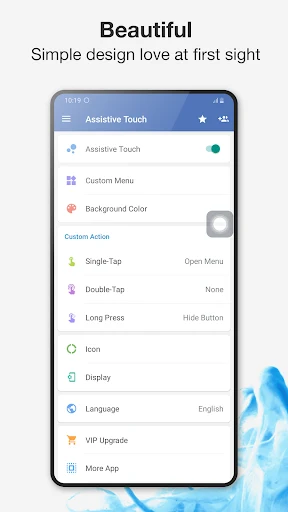
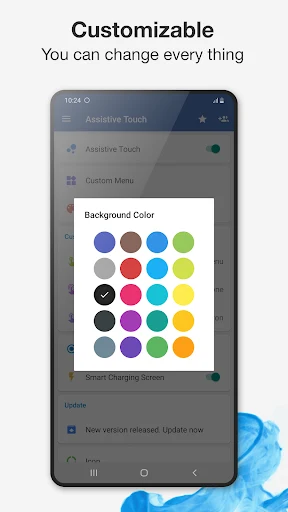
The description says users can choose the background color of the control panel and the icon that represents it. The FAQ in the source adds that the appearance can be customized with colors and icon sets. The one-hand section states that the virtual keys can be used with one hand, for example to take screenshots or set the volume level. The source also says the panel can be activated and used continuously for long periods.
Permissions and documented limitations
The source states that the app uses Device Administrator and Accessibility services for locking the screen, navigating, and accessing the control center. These permissions are documented requirements, so users should review them before installing. The FAQ also says the app does not collect or share personal or sensitive information, and that the control panel does not record data. These statements come from the source and have not been independently verified here. The description does not provide specific Android version compatibility details, so supported versions are not stated.
Version history
View all11 Jul 2025 · stable
Frequently asked questions
How do I uninstall Assistive Touch Mod?
According to the source, you open the app, go to settings, and tap the uninstall button.